
First month free, no commitment
Your salon takes bookings while you sleep.
Clients pick the service, the stylist and the time on your own booking page. Appunta reminds them to show up, and you see everything in one calendar.
We set up your services, staff and opening hours with you. Your clients don't need to install anything.
Friday, 17 October
Salon is closed
Already running on Appunta
- JB Beauty
- Beauty CornerSplit
- Salončić BombončićSplit
-
Fewer no-shows
Reminders go out by SMS, email or push notification, exactly when you decide. Clients who can't make it cancel in time, and the slot opens up for someone else. There's no limit on SMS messages.
-
Fewer calls mid-treatment
Clients book on their own, at any hour. No more answering the phone with gloves on.
-
The whole salon in one place
Staff, devices, shifts and holidays in a single calendar, on your computer and your phone.
A booking page of your own
Every salon gets its own address, like studiolana.appunta.eu, with your logo, colours and cover photo. Share it on Instagram, your Google profile or as a QR code at the front desk.
Service
- Gel manicure 45 min €30
- Pedicure 60 min €35
- Cut and blow-dry 45 min €25
- Gel polish 30 min €20
Staff
- Anyone First available slot
- A Ana
- M Mia
Time
Saturday, 18 October
- 09:00
- 09:45
- 10:30
- 11:15
- 12:00
- 14:30
- 15:15
- 16:00
You're booked
Gel manicure with Ana, Saturday 18 October at 11:15.
A reminder arrives the day before.
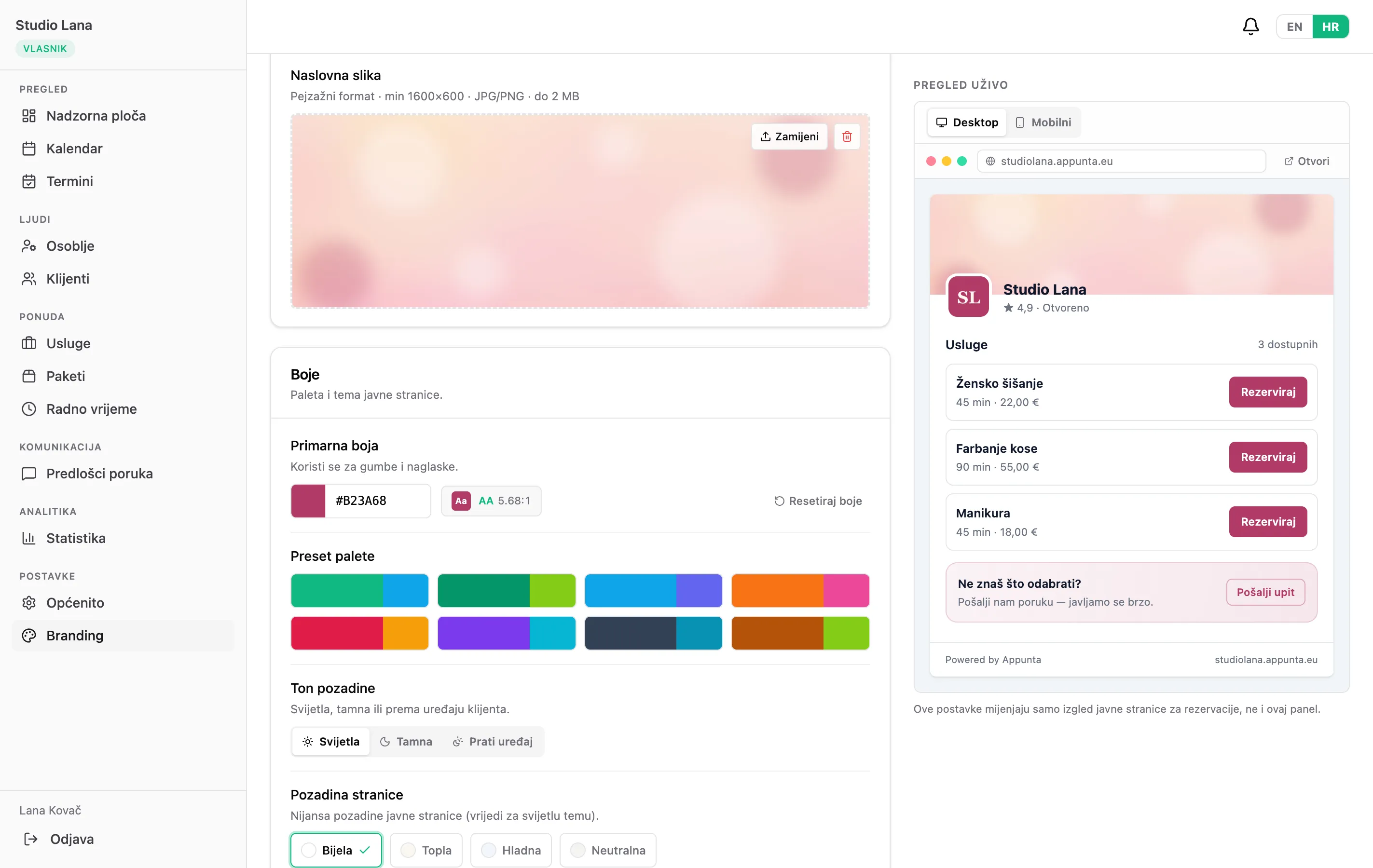
A booking page in your salon's colours
Set your logo, cover photo and colours yourself in a few clicks. The live preview shows exactly what your clients will see, on desktop and on mobile.
- Your logo and cover photo
- Your own colours or a ready-made palette, with a readability check
- Light or dark theme, or follow the client's device
- Live preview before you publish
Everything a salon needs, without extra tools
Appunta covers the whole life of an appointment, from booking to payment.
Booking
- Online booking around the clock on your own page
- You choose when online booking is open, for each day and staff member
- Booking built into your existing website, e.g. WordPress
- Several services in one appointment
- Rules: minimum notice, how far ahead, cancellation deadline
- A schedule without awkward gaps between appointments
- Waiting list: clients are notified when a slot frees up
- Online booking open to everyone or only to clients you added
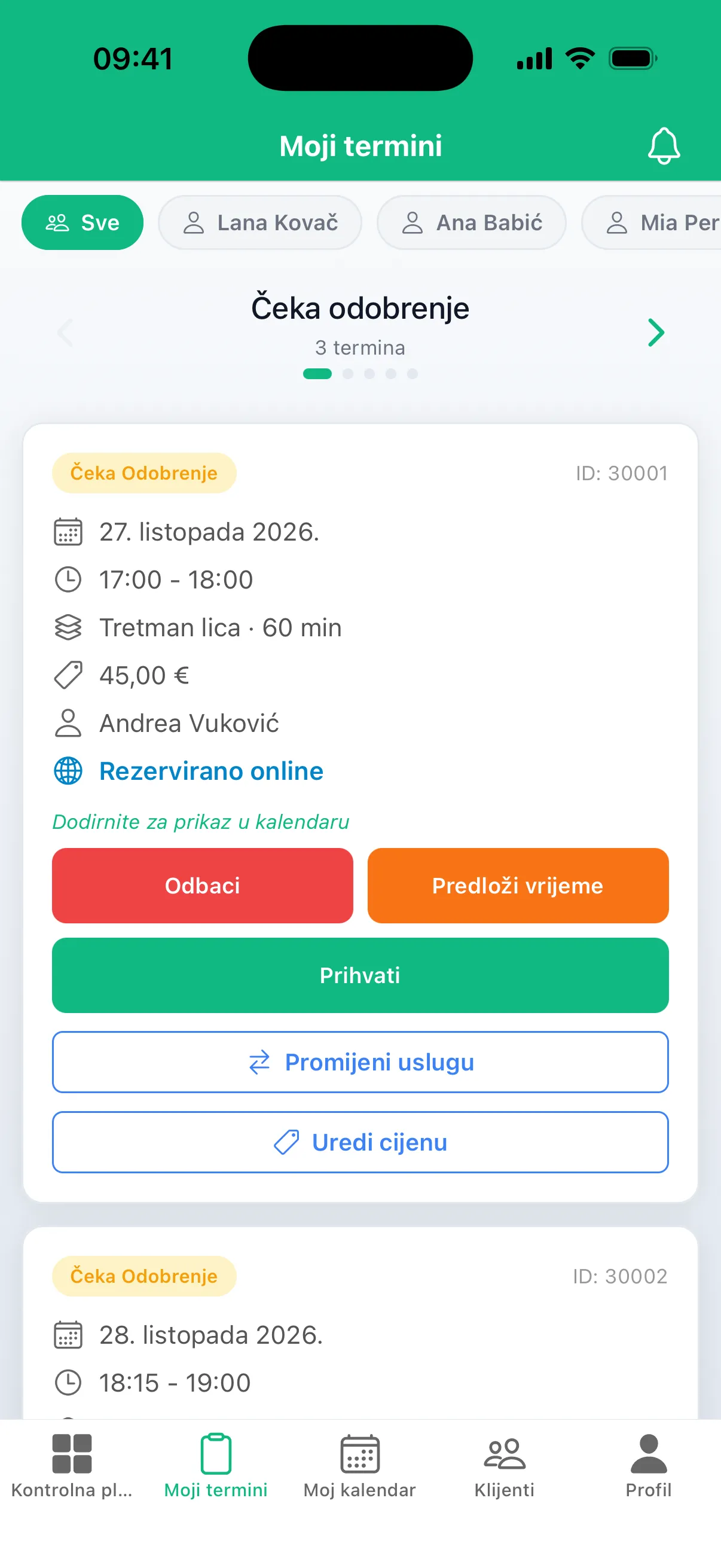
- Manual approval for everyone or only for selected clients, with a suggested alternative time
Reminders and messages
- Reminders by SMS, email and push notification
- Unlimited SMS messages
- Your own message wording, in your salon's name
- Notifications for confirmations, changes and cancellations
- Clients choose how they want to be reminded
Team and rooms
- Working hours and shifts for every staff member
- Holidays and time off
- Devices and rooms with their own calendar, never double-booked
- Permissions for each staff member: who can manage appointments and who can only see them and mark them done
- Croatian public holidays added for you
Clients and business
- Client records with every past and upcoming appointment
- Client notes, with who wrote them and when
- Every appointment shows who booked it and when, or that it was booked online
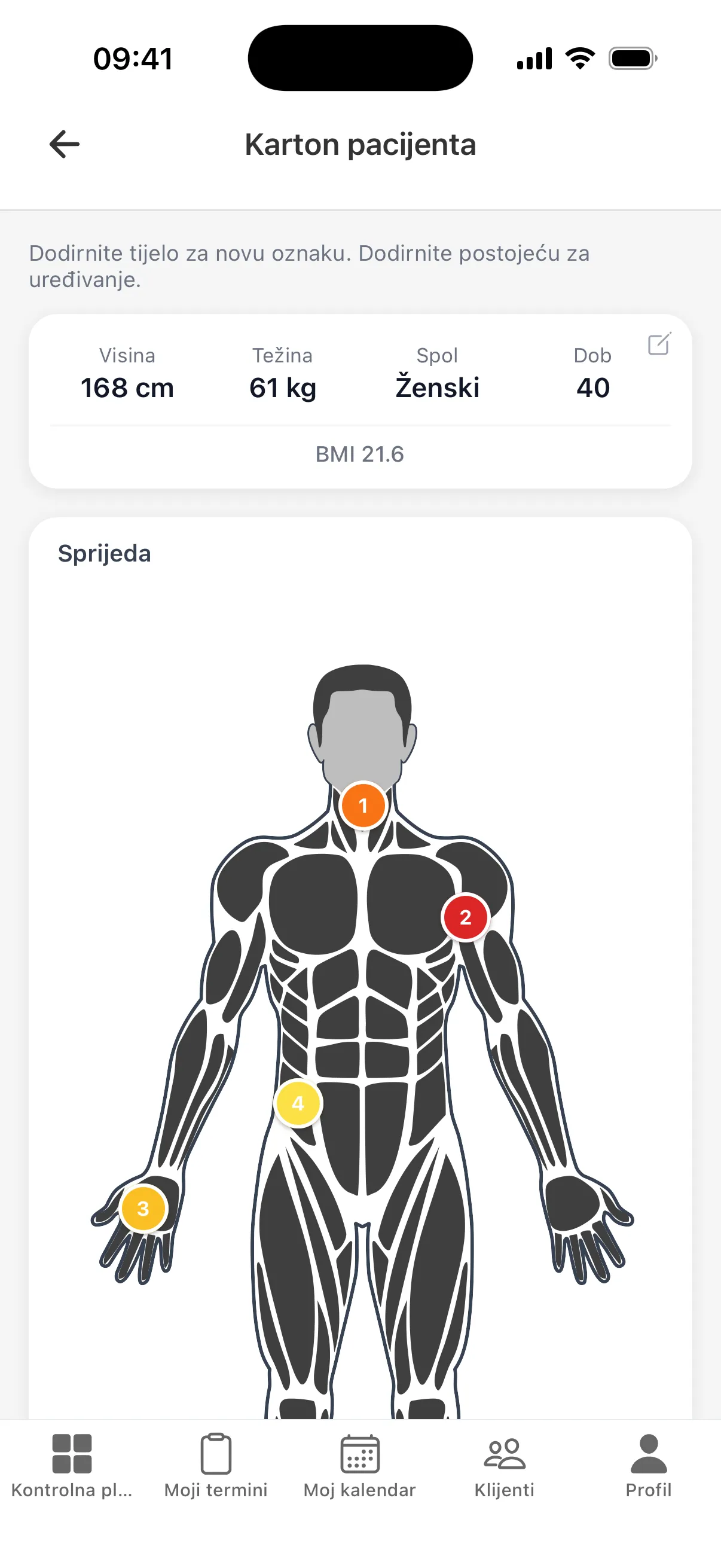
- Patient charts for physiotherapists, with marks on the body
- Import your existing client list
- Packages and prepaid treatments
- Revenue: paid, unpaid and packages
- Mark no-shows and see who misses appointments most
- Finish an appointment unpaid and charge it at the next visit
- Reports by staff member, service and client
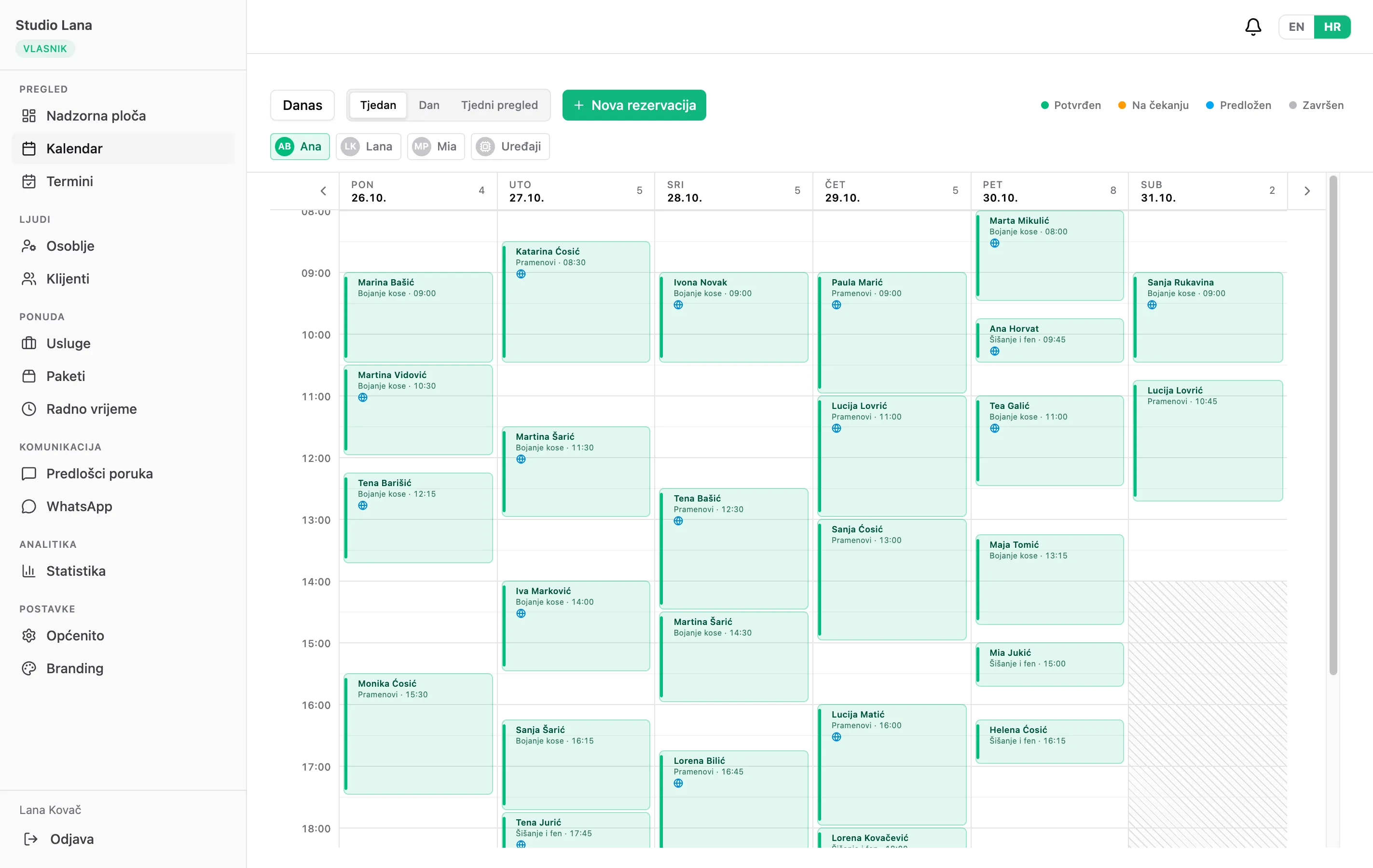
Your whole salon on the big screen
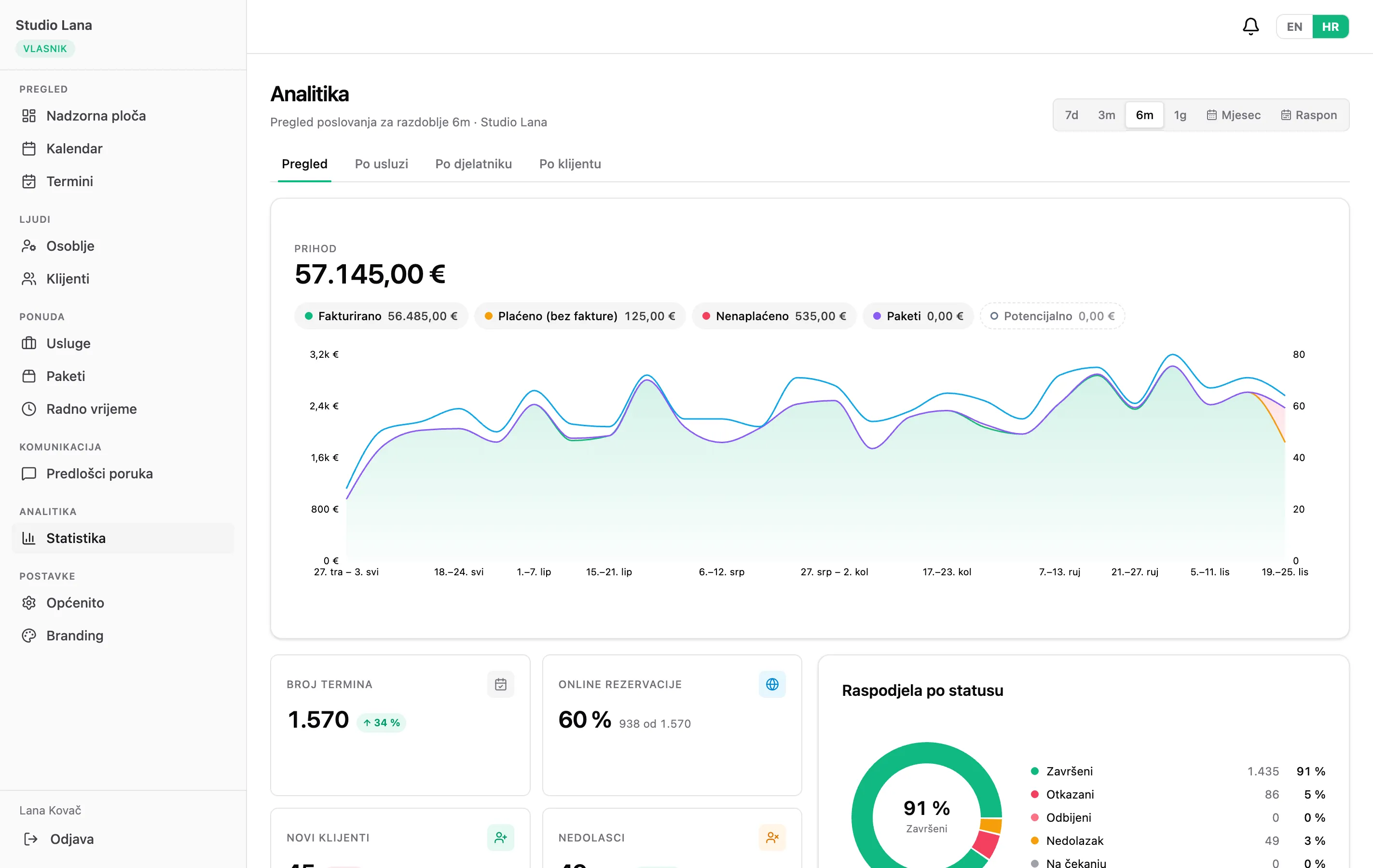
On your computer Appunta runs in the browser, nothing to install. See every staff member's and device's calendar at a glance, and in the stats: weekly revenue, what's been paid and what's still outstanding, the share of online bookings, new clients and no-shows.
Getting started
- 1
Get in touch
Fill in the form or message us. We'll show you Appunta using your own salon as the example.
- 2
We set up your salon together
Services, prices, staff, opening hours and existing clients. You just check that everything looks right.
- 3
Share your link
Put it on Instagram, your Google profile and in messages to clients. From then on, bookings come in on their own.
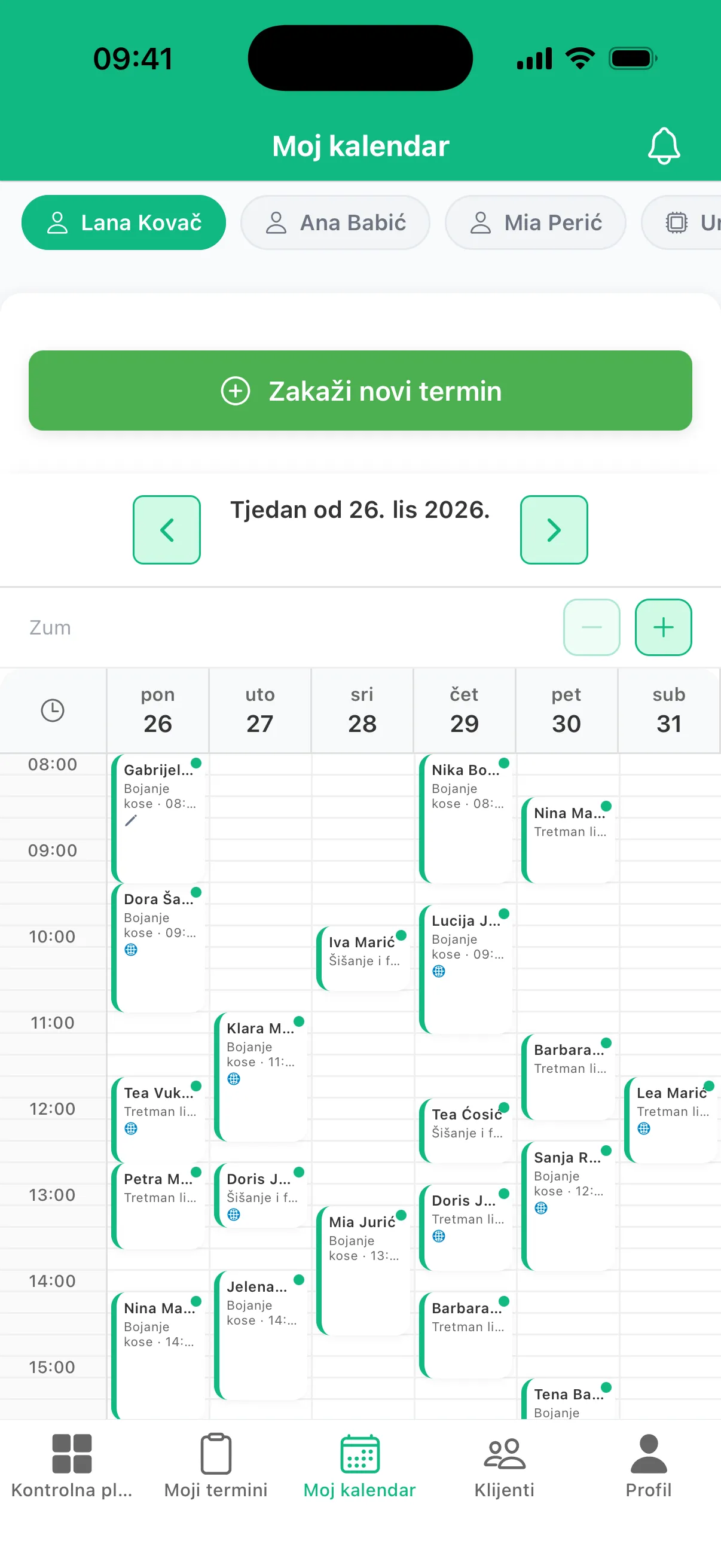
Your calendar goes where you go
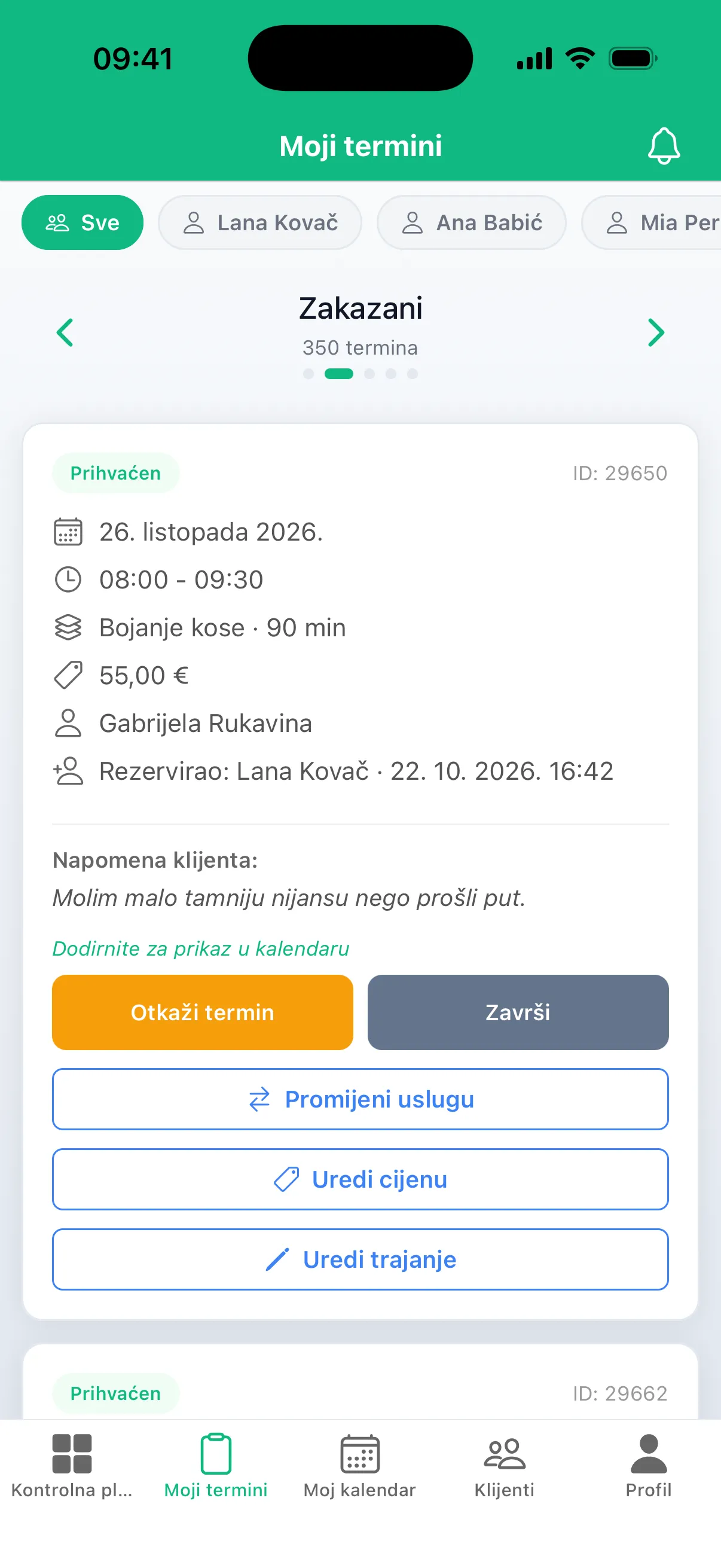
Owners and staff get a mobile app: today's appointments, new requests and a notification the moment a client books or cancels. On a computer, everything works the same in the browser.
- A notification for every new booking
- Accept requests or suggest another time
- Add appointments for clients who call
- Complete, record payment or mark a no-show
- Client notes and who booked each appointment
Made for salons in Croatia
- In Croatian The app, the booking page and every message to your clients.
- Holidays built in Public holidays close bookings without any effort from you.
- SMS to Croatian numbers Reminders arrive as a regular text message, no extra apps.
- Support that knows you You talk to the people who set up your salon.
For physiotherapists
A patient chart next to every appointment
Mark painful areas on a body diagram, each with a severity and a note, alongside the patient's height, weight and BMI. The chart sits with the client, together with their appointment history and treatment notes.
Questions
How much does it cost?
The price depends on the size of your salon, and SMS messages are unlimited. The first month is free, with no commitment. Get in touch and we'll send you an offer for your salon.
Do my clients need to install an app?
No. They book in the browser on your salon's page and sign in with a code sent to their phone or email.
How long does setup take?
We set up your services, staff and opening hours together with you, so most salons can start taking bookings within a few days.
Can I bring my existing clients?
Yes. We import your client list, so from day one you can book them in and send them reminders.
Can I approve bookings myself?
Yes. Bookings can be confirmed automatically or only after you approve them, for all clients or only selected ones, for example those who have missed an appointment before. You can also suggest a different time to the client.
Can I allow online booking only for my regular clients?
Yes. If you turn off self-registration, only clients you have added to Appunta can book online. New clients can still call or message you, and you book them in yourself.
Can I have booking on my own website?
Yes. Within a day we build booking into your site, on WordPress or any other platform. Clients stay on your site and book under your name, with no mention of Appunta.
Can I choose when clients can book online?
Yes. For each shift you choose whether online booking is open and for which part of the day. For example, online only in the afternoon while you book your own clients in the morning, or online every weekday except Friday. You and your staff can still add an appointment at any time.
Can I limit what my staff can see?
Yes. You set permissions for each staff member, from full access to only seeing their own appointments and marking them done.
Can I use Appunta without online booking?
Yes. You can use Appunta as a calendar only: you add the appointments, and clients still get an SMS confirmation and reminder automatically. You can turn on online booking whenever you like.
Do clients I book in myself get reminders too?
Yes. Every client gets a reminder, whether they booked online or you added the appointment.
See Appunta set up for your salon
Leave your details and we'll get in touch to arrange a short demo, in person or over a video call.